Building a Fully Offline Document Chat Desktop App with Tauri, Python, and llama.cpp
- Patrick Kenekayoro
- Tauri , Python , Llama cpp
- April 27, 2026
This is a walkthrough of how I built Chat About Documents, a desktop app where you drag a PDF onto a window and ask questions about it — fully offline. No cloud LLM, no PyTorch, no sentence-transformers, no HuggingFace pipelines. Python is allowed only as glue.
It started as a CLI MVP and ended up as a Tauri app with a SQLite-backed collection, swappable models, and a UI that lets you download new GGUFs from inside the app. We’ll touch four pieces of tech in order: llama.cpp, Python (as glue), Tauri (with a Rust shell), and a vanilla TypeScript frontend.
A note on the constraint: most “chat with your PDF” tutorials reach for sentence-transformers and a vendor LLM in two lines of Python. Both were ruled out here, and that single restriction did most of the design work. Embeddings had to come from a GGUF model running on llama.cpp’s embedding mode. The chat model had to be GGUF too. PDF extraction had to skip OCR/transformer pipelines. Each pick fell out of the constraint — sometimes the most useful constraint is the one that takes the easy answer off the table.
Step 0 — The Problem
A “chat with your documents” app needs three capabilities that are easy to forget are separate things:
- Read text out of files (PDFs, DOCX, plain text…).
- Find the relevant parts of those files for a given question.
- Summarise/answer using a language model that has seen those parts.
A naive solution stuffs the entire document into a chat model’s context. That breaks as soon as the document is bigger than the model’s context window — and is wasteful even when it fits, because the model spends most of its compute on irrelevant text.
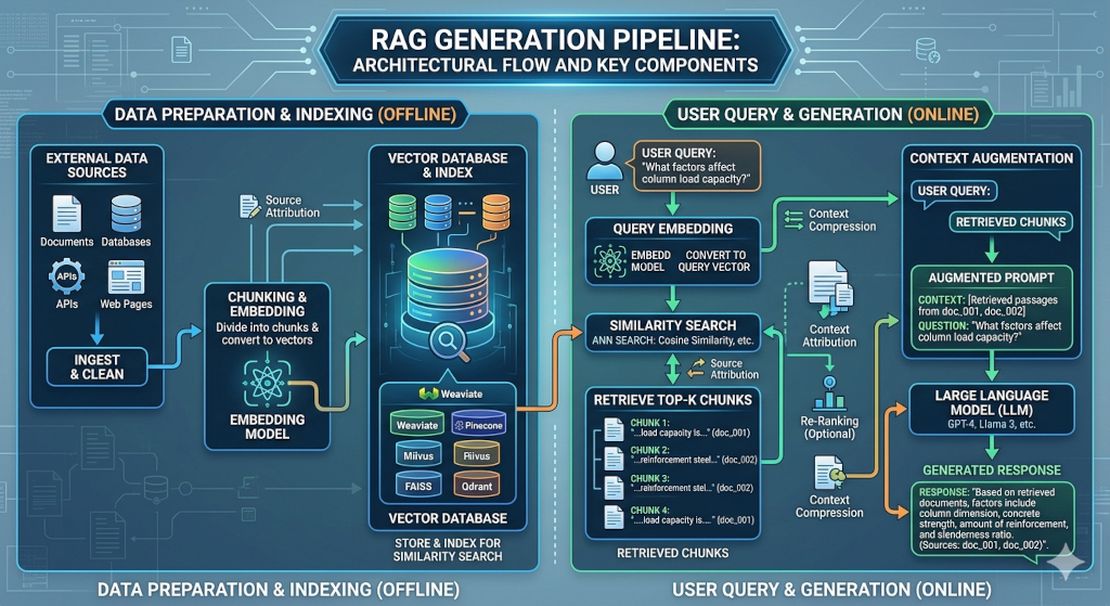
The standard fix is Retrieval-Augmented Generation (RAG). We split the document into chunks, turn each chunk into a vector that captures its meaning, and at query time we fetch only the chunks similar to the question.
text  ─→  chunks  ─→  embeddings (vectors)  ─→  index
                                                 ↓
question  ─→  embedding  ─→  search  ─→  top-K chunks
                                              ↓
                          ┌────────────────────┘
                          ↓
                    chat model + prompt  ─→  answer
That’s the whole shape. Everything else is plumbing.
Step 1 — llama.cpp: One Runtime, Two Model Roles
llama.cpp
is a C/C++ library and CLI suite for running large language models on CPU and GPU. It loads models in a format called GGUF — a single file containing weights, tokenizer, and metadata. Why this matters:
- One toolchain runs chat models (Qwen, Llama, Phi…) and embedding models (nomic-embed, BGE…).
- GGUF supports aggressive quantisation. A 3B-parameter chat model fits in ~2 GB at Q4_K_M.
- Actively maintained and widely used, so you’re following a paved road.
Concretely we use:
llama-server— exposes an OpenAI-compatible HTTP API (/v1/embeddings,/v1/chat/completions). Loads exactly one model per process.- Two models, two servers:
nomic-embed-text-v1.5.Q4_K_M.gguf(≈ 80 MB, 768-dim) for embeddings.qwen2.5-3b-instruct-q4_k_m.gguf(≈ 2 GB) for chat.
Why HTTP? Why not just subprocess per call?
The first version of this project shelled out to llama-cli once per question. It worked, but every question paid a model-load tax:
| Phase | Per-question cost |
|---|---|
| spawn + load 80 MB embed model | 2–3 s |
| spawn + load 2 GB chat model | 10–14 s |
| actual generation | 3–5 s |
| total | ~20 s |
Switching to two persistent llama-server processes that load each model once at startup brings per-question cost down to:
| Phase | Per-question cost |
|---|---|
| boot servers (one-time) | 5–6 s |
| embed query | < 1 s |
| first token after question | 1–2 s |
Same llama.cpp, same models — the win is purely from keeping the model resident in RAM. The trade was about 80 lines of orchestration code (server.py) plus disciplined cleanup of child processes on exit.
A second wall: the “5-token answer” that took 16 seconds
After the server pivot, generations would technically stream — but short answers somehow took as long as long ones. The model would output "2+2 equals 4." and then keep generating padding tokens until max_tokens.
The cause: I was using llama-server’s raw /completion endpoint. No chat template. The model never saw <|im_end|>, never had a clean end-of-turn signal, just kept going until the stop budget. The fix was a one-line endpoint switch to /v1/chat/completions, which makes llama-server apply the model’s own chat template. Generation now ends naturally and short answers are short.
A small change with a 2–3× perceived latency improvement on the common case. Worth knowing if you’re building anything similar.
Takeaway: when a tool exposes both a CLI and a server, the server is almost always right for an interactive app. The CLI shines for batch jobs.
Step 2 — Python as Glue (and Why That’s Enough)
The Python layer is small on purpose. It has six responsibilities:
| Module | What it does |
|---|---|
extract.py | dispatch by file extension to the right text extractor |
chunker.py | split long text into ~800-character pieces with overlap |
embed.py | HTTP client for the embedding llama-server |
llm.py | HTTP client for the chat llama-server (streaming SSE) |
store.py | a tiny FAISS-backed vector store (with numpy fallback) |
db.py | SQLite cache of every chunk and its embedding |
The HTTP clients are just stdlib urllib — no requests, no aiohttp. The CLI tool sits on top:
# chat.py — CLI entrypoint, ~30 lines of glue
text = extract_text(pdf_path)             # extract.py
chunks = chunk_text(text)                 # chunker.py
vectors = embed(chunks)                   # embed.py
store = VectorStore(vectors, chunks)      # store.py

while question := input("> "):
    qvec = embed([question])[0]
    hits = store.search(qvec, k=4)
    prompt = build_prompt(question, hits)
    for token in generate_stream(prompt): # llm.py (SSE)
        print(token, end="", flush=True)
Read those eight lines and you’ve understood the entire pipeline. Every later complication — desktop UI, persistence, model switcher — is an extension of that core.
Why character-based chunking?
Token-aware chunking would need a tokenizer and would still be approximate across two different models (the embed model and the chat model tokenize differently). Character-based chunking with a paragraph/sentence preference is good enough and zero-dependency:
For each sliding window of `size=800` chars with `overlap=150`:
  if "\n\n" is in the upper half → cut at the paragraph
  elif ". " is in the upper half → cut at the sentence
  else                           → cut at the nearest space
English averages ~3.8 characters per token, so 800 chars ≈ 200 tokens, well under any modern embed model’s max input.
From one document to a collection
The next big change was scope: chat about one doc → chat across a collection. The temptation was to keep one VectorStore per document and merge results across them at query time. I went with a single unified index instead, where each chunk carries metadata ({doc, chunk_in_doc, name}). One cosine search, naturally cross-document, no merge logic.
Side effect: this design made it trivial to ask the model to cite by chunk number. The retrieved chunks are numbered [1], [2], … in the prompt; the system prompt tells the model to write [1] inline after the facts it supports; the GUI shows a collapsed Sources (N) panel under each answer mapping the numbers back to doc + chunk + preview. Citation compliance is OK on Qwen 1.5B+, weaker on 1B — but the panel is always there, so even when the inline anchors are missing, the user can see what the model worked from.
Step 3 — Persistence with SQLite
The collection (set of dropped documents + their chunks + their vectors) used to live only in RAM. Restart the app, redo all the work. We persisted it in state.db (SQLite) with three tables:
CREATE TABLE meta   (key TEXT PK, value TEXT);
CREATE TABLE docs   (path TEXT PK, name TEXT, added_at REAL, chunks INT);
CREATE TABLE chunks (id INTEGER PK, doc_path TEXT FK,
                     chunk_in_doc INT, text TEXT, embedding BLOB);
Embeddings are stored as raw little-endian float32 bytes via np.tobytes(). On startup we np.frombuffer() them straight into a numpy array. Disk → RAM in one step.
The embedding-model swap problem
The interesting question is what happens if you switch the embedding model. The vectors in your state.db were produced by Model A. Load Model B, and the vectors are no longer comparable to new queries.
The first impulse is to refuse to start with an “embedding model mismatch — please delete state.db” message. A reviewer push-back I got, quoted in full:
“User should not go through that, bad UX.”
So we don’t. State is the application’s problem, not the user’s. Instead:
- Compute a fingerprint of the embed model file (sha256 of name + size + first/last 64 KB).
- Store it in
meta.embed_model_id. - On startup, compare: if it differs, silently re-embed every stored chunk against the new model and update the fingerprint.
Same thing happens when you switch the embed model at runtime via the Settings panel — the collection is silently re-embedded against the new model. The user never sees the seam, the collection just keeps working.
Takeaway: persistence isn’t just “save to disk.” It’s “can I represent every state transition (model swap, schema bump, upgrade) without making the user fix it for me.”
Step 4 — The Desktop Wrapper: Tauri’s Place in the Stack
You can chat with your documents from the CLI today — python chat.py your.pdf. But most users want to drag a file onto a window. Enter Tauri.
Tauri is “Electron’s smaller, faster cousin.” Specifically:
- Your frontend is HTML/CSS/JS, rendered by the OS’s native WebView (WebKit on macOS/Linux, WebView2 on Windows).
- Your app shell is a small Rust binary that owns the window, routes events, and exposes commands to the frontend via an
invoke()IPC bridge.
The whole bundle is typically a few MB instead of Electron’s 100+ MB, because Tauri ships no browser engine — it reuses the OS’s.
The sidecar pattern: where does Python live?
Our pipeline is Python. Tauri’s app shell is Rust. They have to talk somehow. We chose the sidecar pattern:
+-------------------------+
|  Tauri Rust binary      |  ← spawned when the user opens the app
|   ┌───────────────────┐ |
|   │  WebView (HTML)   │ |  ← HTML + TS, talks to Python via fetch
|   └───────────────────┘ |
|                         |
|   spawns ───→ python api.py     ← HTTP server on a free port
|                  │
|                  spawns ───→ llama-server (embed)
|                  spawns ───→ llama-server (chat)
+-------------------------+
Three layers of subprocess. Each layer adds a tiny amount of code and gives back a clean separation of concerns.
api.py is a stdlib ThreadingHTTPServer exposing one collection over a flat HTTP surface:
GET    /health                     → status, doc/chunk counts
GET    /docs                       → loaded documents
POST   /load     {path}            → append a doc
DELETE /docs     {path}            → remove a doc
POST   /ask      {question}        → SSE stream: hits, then per-token chunks
GET    /models                     → list local GGUFs + presets
POST   /models/active              → switch chat or embed model
POST   /models/download            → SSE stream of download progress
DELETE /models   {path}            → delete a GGUF (with safety rules)
POST   /reset                      → clear collection
The Rust shell is ~80 lines:
// gui/src-tauri/src/lib.rs (sketch)
pub fn run() {
    let port = pick_free_port();          // bind to :0, read assigned port
    let app = tauri::Builder::default()
        .invoke_handler(generate_handler![get_api_port])
        .setup(move |app| {
            let child = spawn_sidecar(port)?;  // spawns ./venv/bin/python api.py
            app.manage(Sidecar { child, port });
            Ok(())
        })
        .build(generate_context!())?;
    app.run(|app, event| {
        if let RunEvent::Exit = event {
            app.state::<Sidecar>().kill();    // tear down api.py on close
        }
    });
}
Two interesting bits:
- Port picking. We bind a probe socket to
127.0.0.1:0. The kernel hands back any free ephemeral port. We close the probe and pass the port toapi.pyvia--port. This avoids the “port 8765 already in use” failure that haunted the first version. - Lifecycle. The
Sidecarstruct is registered with Tauri’s state manager. OnRunEvent::Exitwe kill the child. No orphan Python processes after window close.
How does the frontend find the right port?
Each side calls into the other:
// gui/src/main.ts
import { invoke } from "@tauri-apps/api/core";

const port = await invoke<number>("get_api_port");
const API = `http://127.0.0.1:${port}`;
const r = await fetch(`${API}/load`, { method: "POST", body: ... });
// gui/src-tauri/src/lib.rs
#[tauri::command]
fn get_api_port(state: State<Sidecar>) -> u16 { state.port }
invoke is Tauri’s IPC bridge. Anything decorated with #[tauri::command] is callable from JS by name. It’s the only piece of glue you really need to learn.
Step 5 — Streaming Over Server-Sent Events (SSE)
The chat model produces tokens one at a time. Showing the answer all at once after 5 seconds feels broken. Showing each token as it arrives feels fast, even when the total time is the same.
llama-server supports SSE on /v1/chat/completions when you pass stream: true. The wire format is dead simple:
data: {"choices":[{"delta":{"content":"Hello"},"finish_reason":null}]}

data: {"choices":[{"delta":{"content":" world"},"finish_reason":null}]}

data: {"choices":[{"delta":{},"finish_reason":"stop"}]}

data: [DONE]
Each data: line is a JSON object. Events are separated by blank lines. We forward the same shape from api.py to the GUI:
# api.py /ask handler (simplified)
self._send_sse_headers()                          # text/event-stream
self._sse_event({"hits": [...]})                  # send retrieved sources first
for piece in llm.generate_stream(prompt):
    self._sse_event({"chunk": piece})             # then per-token
self._sse_event("[DONE]")
The frontend reads it with fetch + ReadableStream (you can’t use EventSource because it doesn’t accept POST bodies):
const reader = resp.body!.getReader();
const decoder = new TextDecoder();
let buf = "";
while (true) {
  const { value, done } = await reader.read();
  if (done) break;
  buf += decoder.decode(value, { stream: true });
  // split on "\n\n", parse each "data:" line, render
}
The Connection: close gotcha
This is the bug that nearly cost a Saturday. SSE responses don’t have a Content-Length. The client reads until the server closes the connection. Our first version sent Connection: keep-alive, telling the WebView “this socket is for reuse” — but never actually closed it after [DONE].
The result: WebKit kept the body stream half-open. The WebKit per-origin connection pool filled up over many /ask calls. Eventually new fetches queued forever waiting for a free slot, never reaching the network. Symptom: clicking Ask did nothing, no log on the Python side, no CPU spin.
The fix is two lines:
# api.py
self.send_header("Connection", "close")     # tell client we're closing
self.close_connection = True                # actually close
Plus a defensive reader.cancel() in the frontend’s SSE consumer so the WebView releases the body even if the server forgets next time.
Takeaway: when streaming is involved, close semantics are half the design. Don’t treat SSE as “just HTTP” — confirm both ends agree on when the stream ends.
Step 6 — Defensive Timeouts: When to Give Up
Cloud APIs return errors quickly. Local models can hang for minutes under memory pressure or with degenerate inputs. We layer timeouts so something always surfaces within seconds:
| Layer | Budget | Catches |
|---|---|---|
embed call (urlopen timeout) | 30 s | embed server unresponsive |
| LLM idle (per-read timeout) | 45 s | chat server stops streaming |
| LLM total (wall clock) | 90 s | chat model in degenerate loop |
client AbortController | 60 s | WebView’s fetch never sent (last-ditch) |
When a timeout fires we recycle the affected server: kill the wedged llama-server and spawn a fresh one with the same model. The next question gets a healthy backend.
# api.py /ask handler (excerpt)
try:
    for piece in llm.generate_stream(...):
        ...
except llm.GenerationTimeout:
    self._sse_event({"error": "model didn't respond — recycling..."})
    _recycle_role_unsafe("chat")     # tear down + respawn the chat server
Recycling holds an _inference_lock so concurrent /ask requests wait for a healthy server instead of piling onto the dying one.
Step 7 — Bringing It All Together: The Desktop UX
The frontend is intentionally tiny — one HTML file, one TS file, one CSS file, ~500 lines total:
- Drag-and-drop is one Tauri event:
webview.onDragDropEvent(({ payload }) => { if (payload.type === "drop") loadDoc(payload.paths[0]); }) - Drop zone, doc chips, chat panel — vanilla DOM, no framework.
localStoragepersists the chat history across reloads, so the WebKit-wedge recovery (right-click → Reload) doesn’t lose the conversation.- DOCX support runs through
python-docx(pure Python, no PyTorch). Plus.pdf,.txt,.md,.markdownout of the box.
A Settings modal lets the user manage models from inside the app:
- See which chat and embed models are currently active.
- Switch to any other GGUF in
models/. - Download new ones from a URL (presets list ships Qwen2.5-3B/1.5B, Llama-3.2-1B, and nomic-embed-v1.5 with their official HF URLs). Downloads stream progress over SSE so the UI shows a live progress bar; the file lands as
*.gguf.partfirst and is moved to its final name only on success. - Delete unused models from disk, with safety rails:
- The active chat or embed model can’t be deleted — switch first.
- The last model of a given role can’t be deleted (you’d brick the app).
This is the place where the original “fully offline at runtime” constraint relaxes — the user is explicitly choosing to download. The cold path (drop a model into models/ via the filesystem) still works exactly as before.
Each Settings action is a single fetch into the same api.py.
Step 8 — How the Test Suite Proves It Works
Once the moving parts get plentiful, you need automated tests:
- Unit tests for
chunker,extract,db,models,store— pure functions and small classes, fast and deterministic. - Integration test for
api.py: spin up theThreadingHTTPServerwith mocked embed + LLM clients (nollama-serverin CI), walk/load → /ask → /docs → DELETE. The mocked embed returns a deterministic vector keyed offhash(text); the mocked LLM yields canned chunks.
The integration test caught the Connection: close bug by failing to receive EOF on the SSE response. Worth its weight in coffee.
CI is one GitHub Actions workflow:
# .github/workflows/test.yml (sketch)
runs-on: ubuntu-latest
- setup-python 3.12
- pip install numpy faiss-cpu opendataloader-pdf python-docx pytest
- pytest tests/
61 tests, runs in under 5 seconds. Every push and pull request gets the same green check.
What’s Still Rough
An honest list of known limitations:
- Cold start is ~5–6 s while two
llama-serverprocesses load. The first question after that pays an extra few seconds for prompt processing of the system + retrieved context. Subsequent questions reuse the cached prompt and stream within ~1 s. - CPU-only. Two llama-servers + the Python process land at ~3 GB RAM with the 3B chat model. Not for low-RAM machines.
- Chunker is character-based. Pathologically long paragraphs without sentence breaks will cut mid-sentence.
- No OCR. Scanned PDFs without a text layer come out empty.
- Citation compliance varies by model. Qwen 1.5B+ is good. 1B occasionally skips the inline
[n]markers. The Sources panel is the source of truth. - No conversation history. Each question is independent. Adding history means truncation, summarization, and follow-up rewriting.
- Tauri bundle ships a Python venv (or expects one alongside the binary). A native Rust port of the chunker + retrieval would shrink the install and remove the sidecar lifecycle entirely.
Where to Take It Next
If you want to extend this, the tractable next steps are:
- Bundle for distribution. PyInstaller the Python sidecar into a single binary, wire it via Tauri’s
bundle.externalBin. Now the app installs anywhere without a Python venv. - Conversation history. Each
/askis currently independent. Adding history means storing the last N turns, truncating by tokens, and including them in the chat-completionsmessagesarray. - Schema migrations in
db.py. Right now any schema change silently breaks olderstate.dbfiles. Aschema_versionrow plus a migration table is ten lines and prevents real pain later. - Markdown rendering of answers. The chat model often outputs bullet lists and code; rendering them as markdown is a big quality-of-life win.
- Replace
opendataloader-pdfwith a Rust extractor. No more Java runtime, the bundle shrinks, and the Tauri app becomes truly single-binary distributable.
What You Should Walk Away Knowing
- RAG isn’t magic. It’s chunking + cosine similarity + a prompt that includes the top results. The “intelligence” is in the model.
- The interface boundary often beats the algorithm. Keeping
llama-serverresident across questions was a 10× user-perceived improvement, with zero algorithmic changes. - Tauri ≈ Electron without the browser engine + a small Rust shell + an
invoke()IPC bridge. That’s almost everything you need to know to be productive. - Streaming has close semantics. A keep-alive connection that never closes will eventually wedge the entire frontend.
- Persistent state should self-heal. Asking the user to delete a file is the application giving up.
The whole project is about 1,500 lines of Python and TypeScript, plus ~80 lines of Rust. None of the individual pieces are large; the value is in how cleanly they connect. That’s the part to aim for in your own builds — and a reminder that sometimes the most useful constraint is the one that takes the easy answer off the table.
Checkout the Github Repo: https://github.com/ktarila/chat-with-docs for the full code
Happy coding! 🚀